


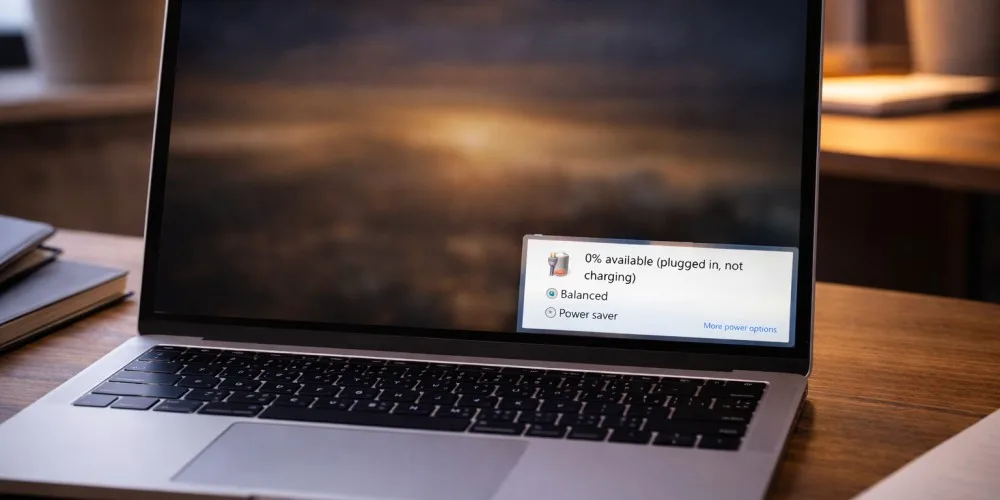
Seeing “Plugged in, not charging” on a laptop is one of the most common and misunderstood battery issues. Many users assume the battery is dead right away, but in reality, the cause is often simpler and sometimes completely fixable without replacing major parts.
This guide focuses on real, proven fixes and helps you understand when the issue is normal behavior, when it is software-related, and when it signals a hardware problem that needs professional attention.
If the issue persists after troubleshooting, the laptop should be checked through professional Laptop Repair Services.
What “Plugged In, Not Charging” Actually Means
This message does not always mean your battery is broken.
It simply means:
- The charger is detected
- Power is reaching the laptop
- The battery is not currently accepting a charge
That can happen by design, by software limitation, or due to a fault.
Understanding the reason matters before spending money on parts.
Fix 1: Battery Protection and Charging Limits (Very Common)
Many modern laptops intentionally stop charging at a certain percentage to protect battery health.
This is especially common on:
- Lenovo
- Dell
- HP
- ASUS
- MacBooks
Manufacturers include battery health features that:
- Stop charging at 80 percent or 85 percent
- Resume charging only after the battery drops lower
- Display “Plugged in, not charging” during this time
What to check:
- Battery or power settings in system software
- Manufacturer utility apps
- BIOS or firmware battery settings
If charging resumes later, this behavior is normal and healthy.
Fix 2: Charger or Cable Issues
A charger can deliver enough power to run the laptop but not enough to charge the battery.
Common causes:
- Third-party or low-wattage chargers
- Worn cables or loose connectors
- Bent charging pins
- USB-C chargers that do not meet power requirements
Signs this is the issue:
- Laptop works only when plugged in
- Battery percentage stays frozen
- Charging works intermittently
Testing with a correct, high-quality charger often reveals the problem quickly.
Fix 3: Battery Calibration Problems
Sometimes the battery is charging, but the system is reporting it incorrectly.
This happens when:
- The battery percentage jumps suddenly
- Laptop shuts down unexpectedly at high percentages
- Charging behavior feels inconsistent
A full battery calibration cycle can help:
- Charge to 100 percent
- Use the laptop until it shuts down
- Let it cool
- Recharge fully without interruption
If the issue improves, the battery itself may still be usable.
Fix 4: Software, Driver, or Firmware Issues
Operating systems rely on battery drivers and firmware to manage charging.
Problems can appear after:
- OS updates
- Driver conflicts
- Corrupted power management files
Things to try:
- Restart the laptop
- Update the operating system
- Update BIOS or firmware
- Reinstall battery or power drivers
If charging works after updates, the issue was software-related.
Fix 5: Overheating and Thermal Protection
When internal temperatures rise, laptops may pause battery charging to prevent damage.
This often happens:
- During gaming or heavy workloads
- When vents are blocked
- If internal dust buildup exists
Signs include:
- Laptop feels hot
- Fans running constantly
- Charging resumes after cooling
Cleaning, airflow improvement, or internal maintenance may be needed. This is a common reason customers seek professional Laptop Repair Services.
Fix 6: Battery Wear and Age
Laptop batteries are consumable components.
Over time:
- Capacity drops
- Charging speed slows
- Charging may stop entirely
If your laptop:
- Is several years old
- Has short battery life
- Only works when plugged in
Then battery replacement may be required. A proper test confirms whether replacement is necessary or if another component is causing the issue.
Fix 7: Charging Port or Internal Power Circuit Problems
If all else fails, the issue may be hardware-related.
Possible faults include:
- Loose or damaged charging ports
- Faulty DC jack or USB-C port
- Power management IC failure
Symptoms:
- Charger feels loose
- Charging works only at certain angles
- No improvement after software fixes
These problems require professional diagnostics and repair.
When “Not Charging” Is Normal vs Not Normal
Normal behavior:
- Charging pauses at high percentages
- Charging resumes after battery drops
- Temporary pauses due to heat
Not normal behavior:
- Battery never charges
- Laptop shuts down when unplugged
- Charging percentage never changes
- Charger works inconsistently
If your situation matches the second group, professional inspection is recommended.
Why Ignoring the Issue Can Cause Bigger Problems
Continuing to use a laptop with unresolved charging issues can lead to:
- Sudden shutdowns
- Data loss
- Swollen batteries
- Damage to internal power components
Early diagnosis prevents more expensive repairs later.
“Plugged in, not charging” does not automatically mean a dead battery. Many cases are caused by settings, chargers, or software behavior. However, when the issue persists across different chargers and settings, it should not be ignored.
A proper diagnosis ensures you fix the actual cause, not just the symptom. When troubleshooting does not resolve the issue, professional Laptop Repair Services provide accurate testing and safe solutions.