Cracked glass, a battery that no longer lasts the morning, a charging cable that has to be held at an angle, or a tablet that will not wake up at all. Those four cover most of what comes through the door, and all four are repairable on the large majority of iPads.
Gadget Ali repairs iPads at two shops, 6551 No. 3 Rd in Richmond and 935 Marine Dr in North Vancouver. Walk in during business hours, no appointment needed at either.
We look at the device first, tell you what we found, and give you a price before anything starts. The inspection costs nothing and there is no obligation to go ahead.
Walk-ins welcome • Richmond and North Vancouver • Free inspection before any quote
Inside Richmond Centre Mall Opp Koodo and BestBuy, 6551 Number 3 Rd MRU-11, Richmond, BC V6Y 2B6
935 Marine Dr #39, North Vancouver, BC V7P 1S3
Call ahead to check availability or walk in during business hours for fast service.
We inspect the device in front of you before quoting anything. That means checking what is actually damaged rather than what appears to be, because a cracked iPad often has more than one thing going on and the price depends on which.
You get a clear number and a realistic time before we start. If we find something else once the tablet is open, you get a call and a revised price rather than a surprise at pickup.
Samsung Galaxy Tab, Lenovo, Amazon Fire and other Android tablets are handled separately. Everything we cover across those brands is on our tablet repair page.

This is the single biggest thing that decides what a cracked iPad costs. On older models the outer glass and the display panel underneath are two separate parts, so if only the glass broke and the picture is still perfect, the glass alone can be replaced and the job is far cheaper.
On the iPad Air, the Pro, and the newer standard models, they are bonded together. Apple laminated the glass onto the panel to make the screen thinner, which looks better and costs more to repair, because a crack in the glass means the whole assembly gets replaced.
Which one you have decides everything else, so we confirm it at inspection rather than guessing. If your screen is lifting away from the body rather than cracked, that is usually a swollen battery instead, and our guide to a screen lifting away from the frame explains how to tell.
Parts for very old models are increasingly hard to source. Bring it in and we will tell you honestly whether we can get what it needs.
No, and it is the question we get asked most. Face ID is tied to the TrueDepth camera module, not to the display, so a screen replacement done properly does not touch it and it keeps working afterwards.
Touch ID lives in the button rather than the screen. Depending on your model that is the home button or the top button, and either way it is a separate part from the display.
Whichever your iPad uses, we test it after the repair and before you collect the device rather than assuming it is fine.
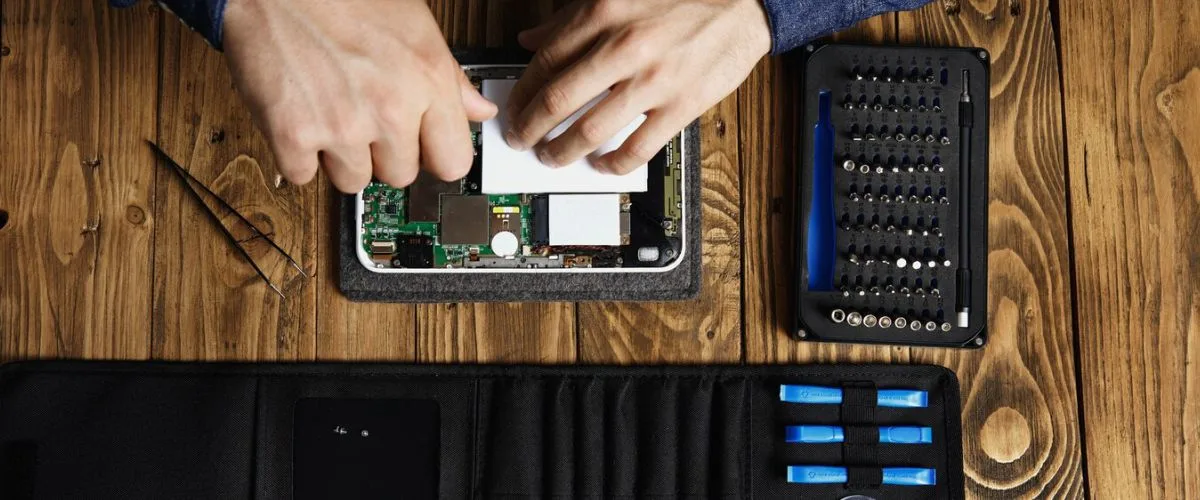
iPad batteries fade rather than fail. There is no dramatic moment. One month it lasts all day, a few months later it is looking for a charger by lunchtime, and the drop from thirty percent to nothing happens in minutes.
Signs the battery is the problem:
We test before we replace. A tablet that will not hold a charge is not always the battery, and sometimes it is the charging circuit. Fitting a new cell into that problem just gives you a new cell with the same symptom.
On an otherwise healthy iPad this is usually well worth doing. A battery costs a fraction of what the tablet is worth, and an older iPad with a fresh cell stays useful for years.
A surprising number of charging problems are lint. Pocket and bag debris compresses into a solid plug at the bottom of the port so the cable never seats fully. Clearing it takes minutes, and if that solves it, that is the whole job.
We check for that first, every time. It costs you nothing and it saves an unnecessary repair often enough to be worth doing before anything else.
When the port itself needs replacing:
Stop forcing the cable in the meantime. Pushing harder on a loose port bends pins and can turn a straightforward part swap into board work.

Most iPads have speakers at both ends of the body, so a failure usually shows up as sound coming from one side only, or audio that sounds thin and off balance rather than gone entirely.
What we see most often:
Crackling and muffling are often the mesh rather than the speaker. Dust and moisture collect in the grille over years, and cleaning sometimes restores it fully, which is worth trying before replacing anything.
We test each speaker separately. That tells us whether it is one module, both, or something further upstream, and it stops us replacing a part that was working.

Do not turn it on and do not charge it. Powering up a wet device is what turns a recoverable tablet into a dead one. Leave it off and bring it in.
The damage is corrosion rather than water. Liquid leaves residue behind that keeps attacking connections long after the device feels dry, which is why an iPad can seem fine for a fortnight and then stop working.
What the service involves:
Nobody can promise an outcome on liquid damage before opening the device, and we will not pretend otherwise. What we can say is that speed changes the result more than anything else. A tablet brought in the same day fares far better than one that sat in a drawer for two weeks.
These are starting prices and the model decides where you land. You get an exact number after inspection, before any work begins.
The inspection itself is free. If we find something beyond what you came in for, you get a call and a revised price rather than a surprise at pickup. Eligible repairs come with a thirty day warranty on parts and labour.
If the iPad is still under warranty and the fault is not accidental damage, start with Apple. That is the right call and we will tell you so rather than take the work.
Out of warranty, the difference is mostly time and access:
Whichever route you take, get the fault identified before you commit. An inspection here costs nothing and you are free to walk out with the information and use it elsewhere.
An iPad screen is held on by adhesive around the entire perimeter. Getting the old one off means heating that seal evenly and working slowly, because the panel is large, thin and unforgiving of pressure in the wrong place.
Fitting the new one is the part people underestimate. Fresh adhesive needs time under pressure to bond properly, and rushing that is exactly how a screen ends up lifting at a corner two weeks later.
So a screen brought in late in the day is often better collected the next morning. We would rather tell you that up front than hand back a repair that will not hold, and we always give you a realistic time at inspection.
No. Face ID belongs to the TrueDepth camera and Touch ID belongs to the button, and neither is part of the display. We test both after every screen repair before handing the device back.
Richmond: 6551 No. 3 Rd, Richmond, BC V6Y 2B6, (604) 399-5566. North Vancouver: 935 Marine Dr #39, North Vancouver, BC V7P 1S3, (604) 700-0231.
No appointment needed at either. Calling ahead only helps if you have an unusual model, where confirming the part is in stock saves you the trip. We serve customers from across the Metro Vancouver area at these two locations.
Prefer to ask first? Send us your model and what is wrong and we will come back with a price range before you come in.