


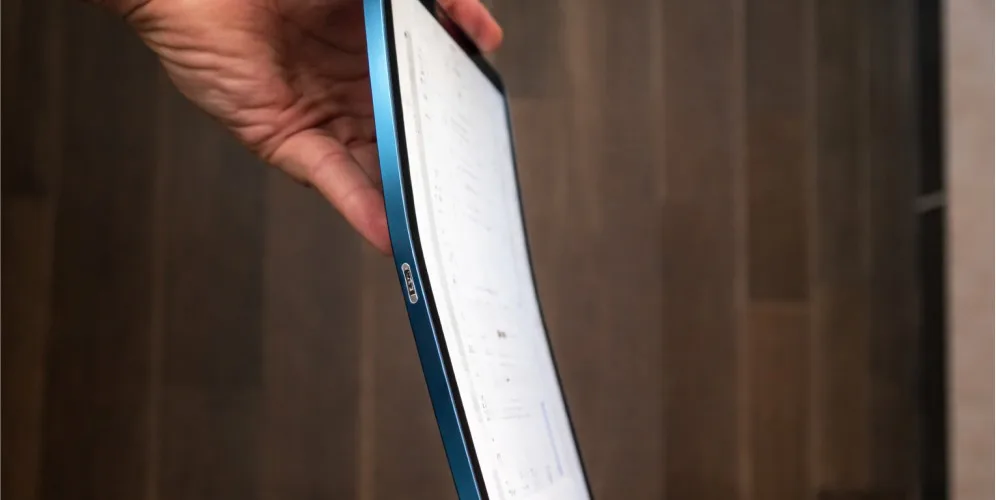
A lifting iPad screen or a distorted body can have more than one cause. A swollen battery is one possibility, but appearance alone cannot confirm the diagnosis.
Do not press the display or bend the frame to test it. This guide explains the visible warning signs, when to stop using the device and what a professional assessment needs to check.
Lifting screen or bent frame? They are different
A bent frame changes the shape of the body. A lifting screen creates a gap between the display and the body. Impact, a previous repair, adhesive problems or internal pressure may contribute to these symptoms.
Not sure what your repair should cost? Get a free estimate from Gadget Ali before any work starts, with no obligation.
Do not assume that a gap proves battery swelling, or that the absence of a remembered drop rules out frame damage. Describe what changed and whether the device was dropped, repaired or exposed to heat. If battery damage is suspected, stop using and charging it until it has been assessed.
Check Without Pressing or Bending the iPad
Look for a visible gap or distortion without pressing on the screen or flexing the body. These signs do not establish the cause by themselves.
If the screen is lifting or battery damage is suspected, stop using and charging the iPad and arrange professional service. Do not squeeze, clamp, tape down or try to straighten the device.
Why a swelling battery pushes the screen out
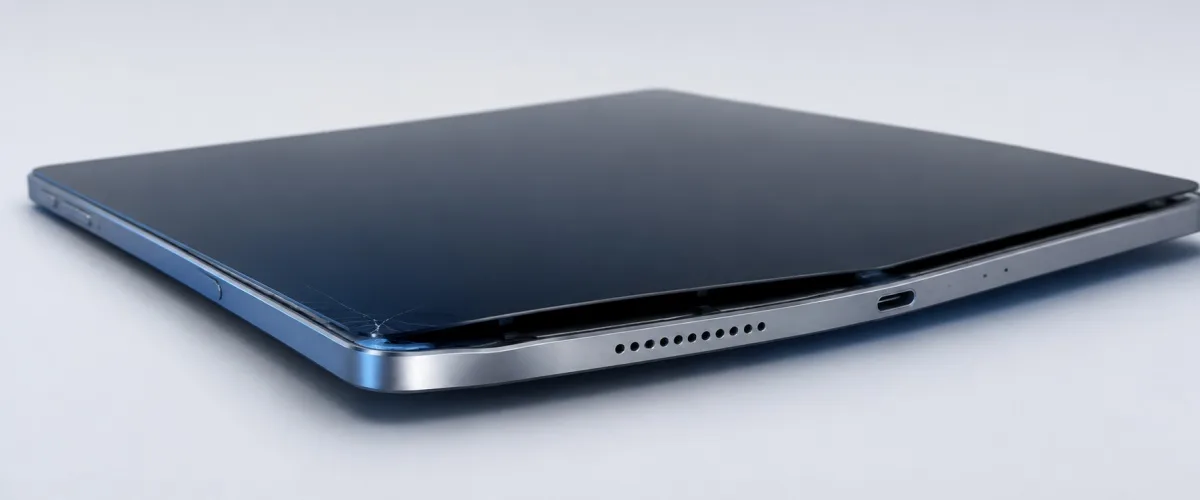
Lithium cells generate gas as they degrade. That gas has nowhere to go, so the soft pouch holding the cell inflates. Inside an iPad the battery sits directly beneath the display, and the display is the only thing with any give.
It starts as a hairline gap and grows. Usually along one edge first, often near a corner. Weeks later that gap is wide enough to see light through, and dust and moisture have been getting in the whole time.
Age and heat bring it on. Older iPads, devices left charging in hot cars or on windowsills, and tablets that live permanently plugged in are the ones we see most often.
A new screen cannot be fitted over a swollen battery. The panel underneath sits higher than the ledge the new glass has to bond to, so the display physically will not seat without crushing what is beneath it. The battery has to come out first, which is why this is one repair rather than two.
Stop charging it and stop pressing on it
A swollen cell is a fire risk, and that is not an exaggeration. A punctured or crushed lithium pouch can ignite. This is the one fault on this page where what you do in the next few days genuinely matters.
Power it off and leave it off. Do not charge it, do not leave it plugged in overnight, and do not try to run it down to empty.
Never try to close the gap. No clamps, no elastic bands, no tape pulling the screen back down. Compressing a swollen cell is exactly the thing that causes it to fail badly.
Keep it away from anything that burns. Not on a bed, not on a sofa, not in a drawer full of paper. A hard surface away from soft furnishings until it can be looked at.
Bring it in rather than opening it yourself. Swollen batteries need to come out slowly and in one piece, and that is worth having done properly. We handle this as part of iPad repair at our Richmond and North Vancouver shops.
What Can Distort an iPad Frame
Pressure, impact or other physical damage can change the shape of the body. The damage history helps a technician understand what to inspect, but it does not prove the cause on its own.
A distorted frame may prevent a display from sitting correctly. Do not try to straighten the iPad or apply pressure to see whether it moves; the battery and internal components may also be affected.
Why the Frame Matters Before Screen Replacement
A replacement display needs a suitable frame and fitting surface. Distortion or other damage can affect the fit, support and adhesive bond, so the frame should be assessed before a new screen is installed.
A repeat crack or lifting display needs a fresh inspection. Frame damage, a fitting problem, battery swelling or another impact may be involved; a repeated failure does not establish the cause by itself.
Can the frame be straightened?
Sometimes, with a mild bend and controlled pressure. A body that is slightly out of true can often be brought back close enough for a new display to seat and bond properly.
Aluminium hardens where it has been bent. Metal that has already deformed once becomes more brittle in that spot. Straightening it works against a material that is now more likely to crack than to move, which is why a second attempt is riskier than the first.
Severe bends are usually not worth chasing. Past a certain point the body will not return to tolerance, and forcing it just moves the stress somewhere else.
It should be assessed with the components out of the way. Straightening a body with the screen and internals still attached puts the load through parts that were not built to take it.
Do Not Diagnose Frame Damage by Appearance Alone
A slight curve, a sharp distortion or a lifting edge should be described to the technician, together with when you first noticed it and any impact or previous repair.
Appearance alone cannot establish whether a change came from manufacturing, physical damage or an internal problem. The device needs an assessment before deciding whether a replacement display can be fitted.
What a proper assessment looks like
Battery first, frame second, screen last. The order matters. Quoting a screen before knowing whether a battery is pushing it out produces a number that will change.
The body gets checked for flatness, not just looked at. A bend of well under a millimetre is enough to stop a display bonding evenly, and that is not something the eye picks up.
You should be told if a repair might not hold. On a badly distorted body, a new screen is a gamble. That is worth saying out loud before you pay for one rather than after.
Other tablets have the same problem. Swollen batteries and warped bodies are not an Apple issue, they are a thin-device issue. We see the same thing across brands and cover it under tablet repair.
Bring it in before the screen comes any further
We will check the battery, measure the body, and tell you whether a screen replacement will hold before quoting anything. If we think it will not, we will say so. Walk in during business hours at 6551 No. 3 Rd in Richmond or 935 Marine Dr in North Vancouver.
You can also send us your model and a photo of the gap and we will tell you what we are most likely looking at. There is no charge for the inspection, and eligible repairs come with a thirty day warranty on parts and labour.